unaveraged
Two extensions for Chrome and Firefox that read receipt CAPTCHA questions on supported NAVER shopping pages. Inference runs on your device through WebAssembly. Each extension fills the answer field for review. Automatic submission is off by default and can be enabled with an explicit submit-button selector in settings.
| Extension | Questions | Default model |
|---|---|---|
| Digit | Phone-number digits and numeric street addresses | conv4-linear2 QAT |
| VQA | Stores, addresses, phone numbers, items, quantities and amounts | W4A8 PTQ |
Both support Korean and English. Enable one extension at a time on a page. These projects are independent and are not affiliated with NAVER or Google.
Models and runtime
- Digit model: an image-only CNN that reads phone and street-number digits in one pass. Question routing then selects the requested digits from that record.
- VQA model: an encoder-decoder model that takes a receipt image and a question and generates a structured answer, covering store, item, quantity and amount questions as well.
- VolvoxAI: the deep-learning engine used
for model conversion and quantization. Its published
volvoxai-liteWASM runtime executes the models inside the extensions on your device.
The default packages use conv4-linear2 QAT for Digit and W4A8 PTQ for VQA. The build downloads their pinned public FP32 sources from Hugging Face and generates the quantized models locally. Digit trains and calibrates on 224 of the 256 synthetic receipts, with 32 reserved for validation; VQA calibrates on all 256.
Synthetic examples
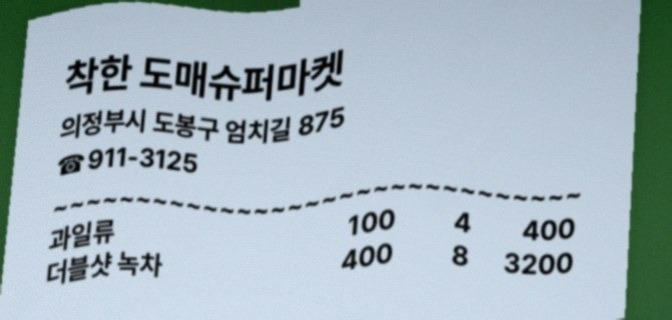
These are the model repositories' public synthetic receipts, bundled locally without image changes. The captions show expected answers from their example files.
| Digit · phone/address digits | VQA · receipt questions |
|---|---|
 |
 |
| “가게 전화번호의 뒤에서 1번째 숫자는 무엇입니까?” Expected answer: 6 |
“가게 이름은 무엇입니까?” Expected answer: 착한 도매슈퍼마켓 “과일류 개수는 몇 개입니까?” → 4 |
Images: Apache-2.0. Sources, pinned revisions and hashes · License · Attribution.
Install
Install directly from the Chrome Web Store:
- Digit: unaveraged Digit (aibjkkjaomgeppjjeekimpdoonndhmmb)
- VQA: unaveraged VQA (fdbkjhljjjacepioaemjjigaicbammaa)
Alternatively, download and extract an extension ZIP from GitHub Releases, or build the packages
below. Each ZIP includes its selected quantized model and WASM runtime.
Open chrome://extensions, enable Developer mode, select Load unpacked,
and choose the extracted folder containing manifest.json:
| Output | Digit | VQA |
|---|---|---|
| Folder | dist/digit/conv4-linear2/chrome/ |
dist/vqa/w4a8/chrome/ |
| ZIP | dist/digit/conv4-linear2/unaveraged-digit-chrome.zip |
dist/vqa/w4a8/unaveraged-vqa-chrome.zip |
For Firefox, the same build also creates firefox/ folders and
unaveraged-digit-firefox.zip / unaveraged-vqa-firefox.zip beside the Chrome
outputs. Open about:debugging#/runtime/this-firefox, select Load Temporary
Add-on, and choose manifest.json inside the extracted Firefox folder. This
development installation lasts until Firefox restarts; permanent installation
requires a Mozilla-signed package.
Chrome 116+ or desktop Firefox 140+ is required. Reload the supported page after installation.
Default watched hosts are smartstore.naver.com and shopping.naver.com, including
/ns/home. The receipt image, question and editable answer field must be present.
Models can answer incorrectly, and site layout changes can affect operation.
Build
Requirements: Linux x86_64, Python 3.10+ with venv and pip/ensurepip, Node.js
22.12+, npm and GNU Make. The build installs pinned dependencies and uses the
published VolvoxAI 0.9.0 Python package and volvoxai-lite@0.9.0 WASM runtime.
Python controls the native VolvoxAI engine: Digit QAT uses TrainingSession
and AdamW, while PTQ uses VxQuantizationServiceClient. ONNX conversion calls
the Python CLI, python -m volvoxai export; no standalone native CLI is invoked.
The browser only runs the resulting models through the lite WASM runtime.
Clone the repository and run:
make
The build downloads and verifies the pinned FP32 releases, converts them through
VolvoxAI, and generates the default quantized models from synth/. Digit uses
receipts 000000–000223 for training and calibration and 000224–000255 for
validation: two epochs, 512 samples per epoch, batch size 4, learning rate 3e-5,
and seed 20261025. VQA uses 256 calibration images with seed 20261027.
Digit weight training defaults to CPU and can take substantial time. Set
QAT_BACKEND=cuda when a supported CUDA device is available; activation
calibration uses CPU. JOBS=auto (the default) requests the available logical CPU
count minus two for native training, calibration and validation sessions,
with a minimum of one. For example, 12 available CPUs select 10 threads:
make                 # Automatic CPU budget: available CPUs minus two
make JOBS=10         # Explicit native thread budget
make JOBS=1          # Single-thread model preparation
Models build sequentially and QAT keeps one synchronized optimizer. JOBS
controls native engine threads; make -j does not parallelize training.
VolvoxAI 0.9.0 caps its native thread pool at 16, and some CPU backward operations
are sequential. Extra threads can improve supported stages but do not guarantee
full CPU use or proportional speedups. Changing the count affects newly started
sessions, not a running build;
interrupting QAT and rerunning starts its training again. Thread counts can also
change floating-point results, so newly generated weights still require checks.
Re-running make rebuilds the models. make package reuses
the model caches under .cache/ without training or calibration. Both browser
packages share the same model and WASM files; model preparation runs once per model.
Generated
weights and training outputs are not included in source exports.
The everyday commands are:
| Command | What it does |
|---|---|
make |
Train/calibrate the default models and build Chrome + Firefox packages. |
make package |
Refresh extension packages from cached models, without training. |
make test |
Test existing packages, without rebuilding or training models. |
make demo |
Stage existing packages and serve the example at http://127.0.0.1:8000/example/. |
make release |
Validate and upload local packages to the fixed model store for Pages. |
make clean |
Remove dist/; keep downloaded sources and model caches. |
make help |
Show this command list. |
Select a model or browser with options instead of separate commands:
make MODEL=digit QAT_BACKEND=cuda            # Train/build Digit using CUDA
make package MODEL=vqa BROWSER=firefox       # Refresh only the Firefox VQA package
make test MODEL=digit BROWSER=chrome         # Test the existing Chrome Digit package
make demo PORT=8123                          # Serve the example on another local port
MODEL and BROWSER default to all. Optional precision profiles remain
available with PRECISION=w8a8 (both models) or another supported model profile.
Use the same PRECISION value when testing its packages.
See the model READMEs for input/output details. Model/runtime hashes and dependency
origins are recorded in build-info.json.
An existing evaluated artifact can optionally be imported with
.venv/bin/python shared/build.py --model digit --model-source /path/to/verified/conv4-linear2
or the equivalent --model vqa --model-source /path/to/verified/w4a8. These explicit imports must
match the graph, weight and provenance hashes in the corresponding
frozen-profiles.json; they are separate from the default fresh build.
GitHub Releases
make release validates the existing four ZIPs and uploads them with
SHA256SUMS to the fixed models Release, creating it if necessary and replacing
its assets on later uploads. It never trains, calibrates or rebuilds models.
This Release is a model store; its tag is not the Pages source revision.
No TAG input is needed. Use make release DRY_RUN=1 for an offline preview or
make release ACTION=check for local validation only.
For a separate versioned extension release, supply TAG=vX.Y.Z as below.
Install GitHub CLI, sign in with gh auth login, and
push the release commit to GitHub. After the first make, refresh packages when
extension source changes, test them and publish:
make package
make test
make release TAG=v0.1.0 REPO=OWNER/REPO
release uploads four production ZIPs: Chrome and Firefox packages for
Digit conv4-linear2 QAT and VQA W4A8 PTQ, plus SHA256SUMS.
It checks model hashes, runtime, production configuration and
archive contents before uploading.
A new tag targets the current commit. TAG is the repository release version;
the extension and runtime versions remain recorded inside each ZIP.
Omit REPO when GitHub CLI can infer it from the Git remote.
Use DRY_RUN=1 to validate the ZIPs and preview the command without uploading,
or DRAFT=1 to create a draft release. For a release that already exists:
make release ACTION=upload TAG=v0.1.0 REPO=OWNER/REPO
Add CLOBBER=1 to replace assets with the same names. Release commands use the
existing default builds in dist/. make release ACTION=check validates them
offline without a GitHub login. Re-run make when changing model generation;
make package is sufficient for extension-only changes.
Performance
Benchmark results and reproduction cover the latest VolvoxAI 0.9.0 measurements, the 13-model Digit comparison, VQA timings and model identities. Measurements describe fixed recorded artifacts; newly trained or calibrated models need their own evaluation.
Test
make test                              # Verify existing packages in both browsers
make test MODEL=digit                   # Verify one model
make test BROWSER=firefox               # Run browser checks only in Firefox
make test does not retrain or regenerate the packaged models. Build once with make,
or refresh cached packages with make package before testing changes.
Checks cover native ONNX parity, preprocessing, model outputs and real Chrome/Firefox
extension behavior. They use public synthetic receipts and local intercepted
responses, without contacting NAVER. Reports stay in ignored test-results/.
Set RECEIPT_CHROME=/path/to/chrome to use an existing Chrome installation.
Set RECEIPT_FIREFOX=/path/to/firefox to use an existing Firefox installation.
Settings and diagnostics
Open the extension popup and choose 설정 (Settings). Settings are local to each installed reader and browser. The page supports:
- Watched URL patterns, an optional container CSS selector, and image/question/answer selectors.
- Worker count (1–4), total admitted requests (1–64, including active reads), and idle timeout (default 60 seconds).
- Automatic submission, off by default. When enabled, a visible, enabled button matching the configured selector is clicked only after a successful automatic answer fill. Edited, stale, unsupported or failed results are not automatically submitted. Manual 답 입력 does not trigger automatic submission.
- Optional engine profiling with bounded worker/queue/error history, plus status refresh and local diagnostic export.
Grant access when adding a new watched site, then reload its open pages. CSS selectors must match that site's receipt image, question, answer and optional submit button. Additional sites still need to use the receipt/question formats supported by the selected model. More workers load more copies of the model and use more memory. Model batch size remains 1; worker count controls concurrent requests, not tensor batching.
Inference memory lifecycle
Each extension shares its configured worker pool across tabs (one worker by default). Workers load models on demand. After the last read finishes, the configured idle timeout (one minute by default) terminates every worker, releasing its model, WASM heap and result cache. Status checks do not extend this deadline, and active reads finish before idle cleanup. The next read creates a fresh worker and loads the model again.
Chrome also closes its offscreen document. Firefox uses a non-persistent background page, which the browser may unload earlier when idle. This releases the inference resources; the installed extension, toolbar button and small content script on open supported pages remain available. Browser scheduling and memory allocators determine when the released memory disappears from process memory measurements.
Privacy and public documentation
The extensions do not send receipts, questions or inference results to the developer. Results are cached in memory; idle inference workers are released after approximately one minute by default. Preferences are saved locally; optional diagnostic exports contain execution metadata. The target website can read answers filled into its input field. See the privacy policy for the full scope.
Markdown files are the documentation sources. make docs renders them into
dist/pages/; make demo and the Pages workflow render them automatically.
README.md becomes index.html, PRIVACY.md becomes privacy.html, and the
model, synthetic-data, benchmark and store guides each become a page.
Benchmark tables are generated from the two JSON reports in benchmarks/.
The same Markdown renderer builds the extension's packaged privacy page.
Edit the Markdown or benchmark JSON, never the generated HTML.
For GitHub Pages, choose Settings → Pages → Source → GitHub Actions and use
the workflow described below. Neither the repository root nor /docs is a
publishable site. docs/ contains only site assets and renderer dependencies;
the interactive example/ and extension HTML files remain authored UI sources.
See store registration notes for listing details.
python3 shared/build.py --source exports the source allowlist to dist/source/ and
dist/unaveraged-source.zip, excluding Git history, caches and private datasets.
make clean removes build outputs. Source/build scripts and models are
Apache-2.0; VolvoxAI and adapted routing/tokenizer code are MIT. See
LICENSE and NOTICE.
Attention heatmaps and live example
Heatmap capture is on by default in settings. Both the receipt panel and extension popup start with Show heatmap enabled; switching the view does not run inference again. The overlay uses real final-layer attention: Digit selects the requested digit slots (42 × 10), while VQA averages the final decoder cross attention over eight heads and answer tokens (21 × 10 image cells). Colors show relative intensity within that image, not causal attribution or confidence. The packaged model and weights remain unchanged; the runtime exposes existing attention tensors through a derived graph output contract.
Rendering rasterizes the small attention grid once per result and lets the browser scale it over the receipt. There is no continuous rendering loop or idle polling. Only one popup preview is held in memory, cleared on worker release or when heatmaps are disabled. Profiling remains optional and bounded; no receipt images are written to diagnostic exports.
The original UI in example/ offers the two licensed public model examples and
all 256 receipts in synth/. Only the selected image is downloaded. Choose a
question preset or type your own; presets adapt to the model and receipt fields,
including phone positions, street numbers, stores, item quantities, prices and
totals. Correctness badges appear only when a matching annotation answer is
known. The demo runs one worker only after Run is clicked and releases it
after one idle minute; changing the receipt or question reuses the loaded model.
Stage and serve the existing packaged models with one command:
make demo
Open http://127.0.0.1:8000/example/; use PORT=8123 to change the port and
Ctrl-C to stop. This does not rebuild models. After extension code changes,
run make package first. To stage files without starting a server, run
.venv/bin/python shared/pages.py.
For hosting, choose Settings → Pages → Source → GitHub Actions once. Models are generated only on your local machine. Prepare and upload them:
make package        # Reuse existing locally generated models
make release        # Create/update the fixed model store; no TAG input needed
If model caches do not exist yet, run make locally before packaging. Run local
checks with make test before uploading changed models. GitHub never runs model
training, conversion or calibration, and does not generate replacement models
when assets are missing. Missing or incompatible uploads stop deployment.
The Build and publish example workflow deploys on pushes to the default
branch (main in this repository; master is also supported). After committing
source changes, push:
git push origin main
Actions downloads the locally built Chrome ZIPs and SHA256SUMS from the fixed
models Release. It verifies checksums, keeps model and vendor runtime bytes
unchanged, and combines them with the current branch's documentation, demo and
compatible adapter/runtime glue code. Model binaries stay out of Git history.
The browser serves all required files from the Pages origin; the demo identifies
its source commit and the uploaded model archive hashes. Source-only changes
can reuse the same model upload. When local models change, run make release
again, then push source changes or manually run the workflow with deploy checked.
For a downloadable preview without deployment, run the workflow manually with deploy unchecked on the default branch. Versioned extension Releases remain optional; Pages always uses the fixed local-model store.
A private personal repository needs GitHub Pro for Pages. The repository can remain private while the site is public; deployed HTML, JavaScript and model files are then publicly downloadable. Private model assets are downloaded by Actions with its repository token; no token is included in the site.